Interview answers written from your resume
In an interview, it’s easy to give a general answer and forget the project that proves your point. NextBeing reads your resume, notes and the job post before the call. Each answer it writes uses your own projects and numbers, and leaves a blank where your files say nothing.
Windows 11 · Plans from $49 a month · 14-day money-back guarantee
On a phone? Email yourself the link for your PC.
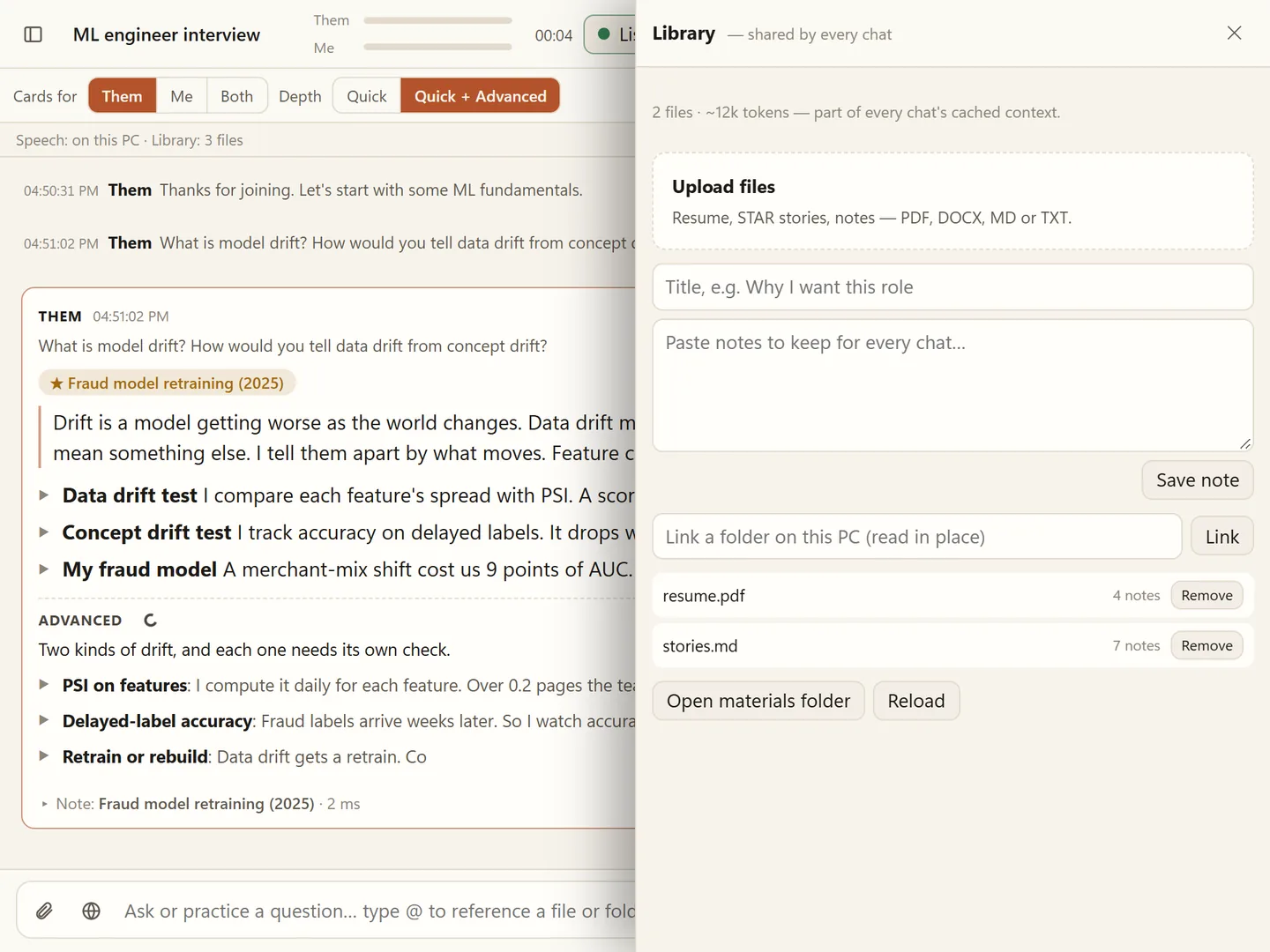 123
- 1Your job post and notes, attached to this chat and read once
- 2Add more files here, such as your resume, at any time
- 3The answer to their question, written from this chat’s documents
Why it helps
Answers use your own work
Each line about you in the prep quotes your documents, so you can check where it came from. A new “tell me about a time” question gets a story you haven’t told yet.
Answers fit the job you applied for
It lists what the job post asks for, with your evidence for each. That is what the interviewer scores: in a 2022 review of hiring research, structured interviews scored against the job predicted job performance best.
It asks you instead of guessing
When your files don’t say something, the answer leaves a blank, such as “a team of [how many?]”. The question waits in Memory until you answer it. After that, every answer in the chat uses what you said.
How it works
- Attach your resume, notes and the job post with + in a new chat.
- Wait about 45 seconds while it reads them and writes your prep.
- Answer the open questions in Memory, such as your team’s size.
- Click Listen in the call, or start a Practice round to rehearse.
- Say the answer that comes up, built from your own projects.
- Use the same chat for the next round; it keeps what each call taught.
Questions about answers from your resume
Which files can I attach?
PDF, Word, Markdown and plain text, code files and pictures. Your resume, notes and the job post are enough to start. Each chat has its own files, so one job’s documents stay out of another’s.
Where do my documents go?
They are stored on your PC, and you can delete them in the app. To write an answer, their text goes to our servers with the call’s text, and it is not kept there. Audio is never stored or sent.
What if an answer gets a fact wrong?
Then you fix it once. Correct the fact in Memory, and the next answers use it; your own lines there stay as written. Each line about you in the prep shows its quote, so a wrong one is easy to spot.
Does it look up the company online?
Only if you ask. The prep reads your files, not the web. Search the web in the + menu looks up what you ask, such as the company’s news. If your files link their job board, it also reads up to 12 of their other open posts.
Does it work on a Mac?
Not yet. The Mac app is coming soon, for Macs with Apple silicon on macOS 15 or later. The Mac page shows how it will work and can email you the day it is out.
Can I use it in a real interview?
Only where AI help is allowed, so check the interview’s rules first. Practice works anywhere: an AI interviewer asks you questions from the job post and your resume.
What you can change
Each chat has its own documents and memory. These change what its answers draw on.
Step by step: on Windows → · on a Mac →
More: Coding interview exercises · AI mock interviews · Live interview answers · Code typer · System design interviews