NextBeing

AI interview assistant for practice and live coding rounds

NextBeing is a Windows app for job interviews. Start with Practice. An AI interviewer asks you real questions out loud and grades each answer. In the real interview, it listens to the call. It shows you an answer to say, written from your resume and notes. In coding rounds it writes the code and can type it for you.

~1 sfirst answer on screen
3–5 sdeeper answer starts
12languages in coding rounds

We'll email you the day it launches. Waitlist members get a launch discount.

From $49 a monthCancel any time
⊞ Windows coming soonMac · join the waitlist
AnswerCodeDesign
Live answers: the question and the answer to say
Coding round: the code with a sentence to say per line
System design round: the chat and the board side by side
Answers in about 1 second Types the code for you Practice mode System design Uses your resume Hidden from screen share Reads your screen Marks typos in red Handles new requirements

Features

Each screenshot is the real app, sized to half of a laptop screen. Tap one to see it full size.

01

Live answers during the interview

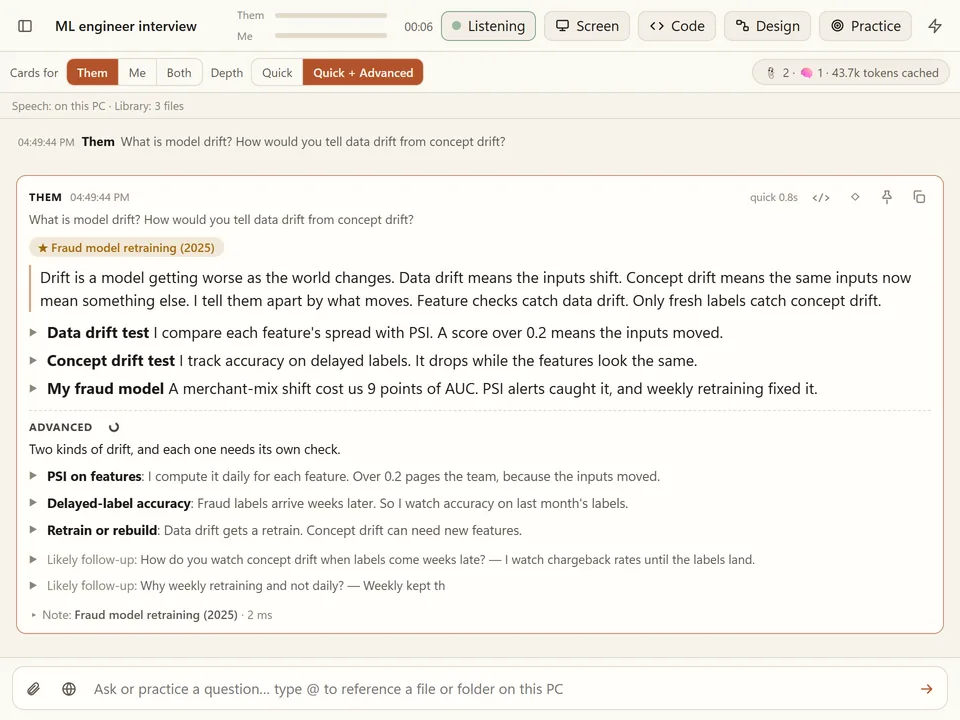
The interviewer asks a question. About one second later, an answer appears on your screen.

  1. 1Press Listen. It hears you and the interviewer.
  2. 2You get a short answer to say first. Then three points to add.
  3. 3A detailed answer follows a few seconds later. Words you've said get a tick.
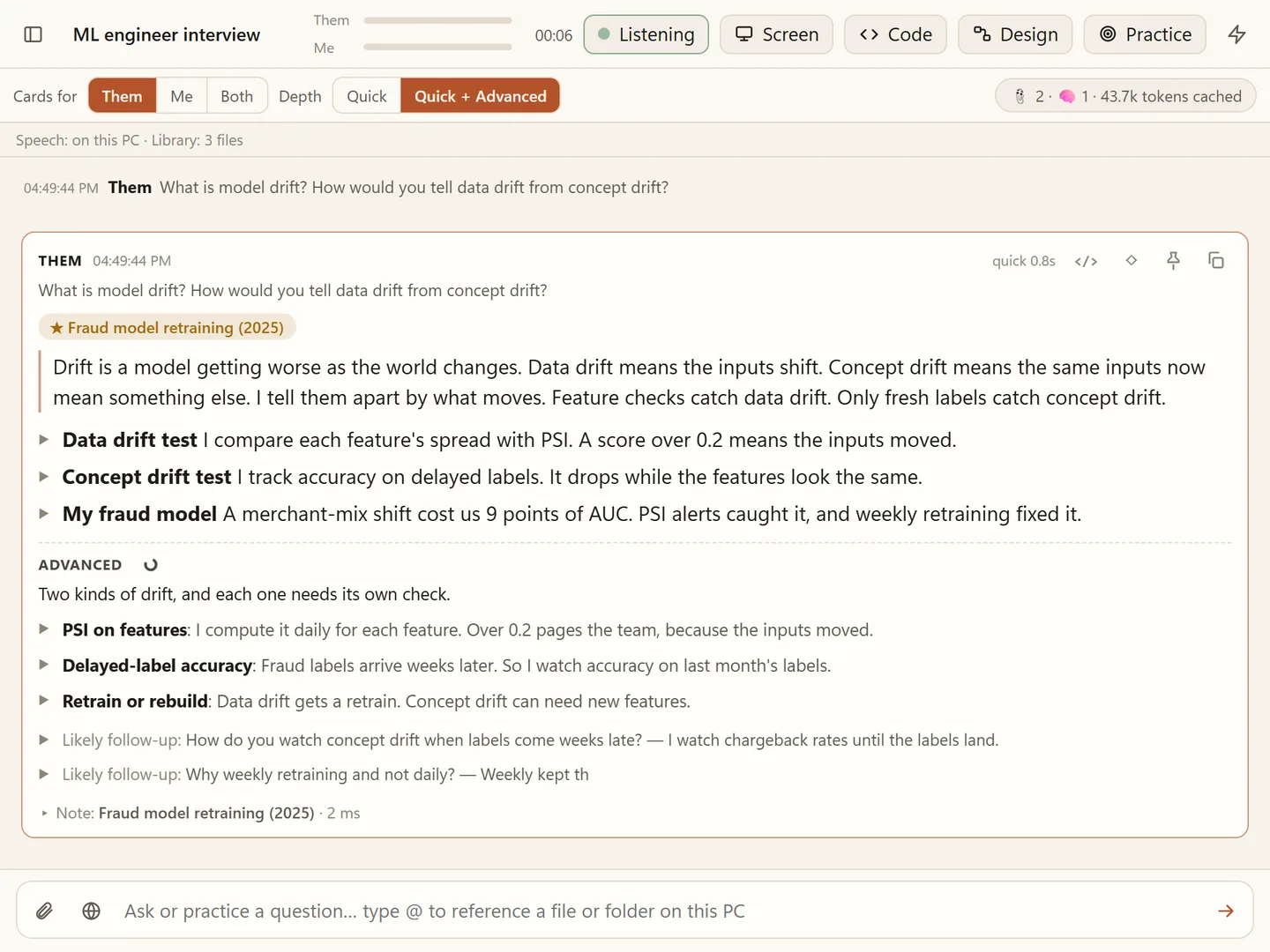
The app at half a screen: their question, the short answer, three points, the detailed answer.
02

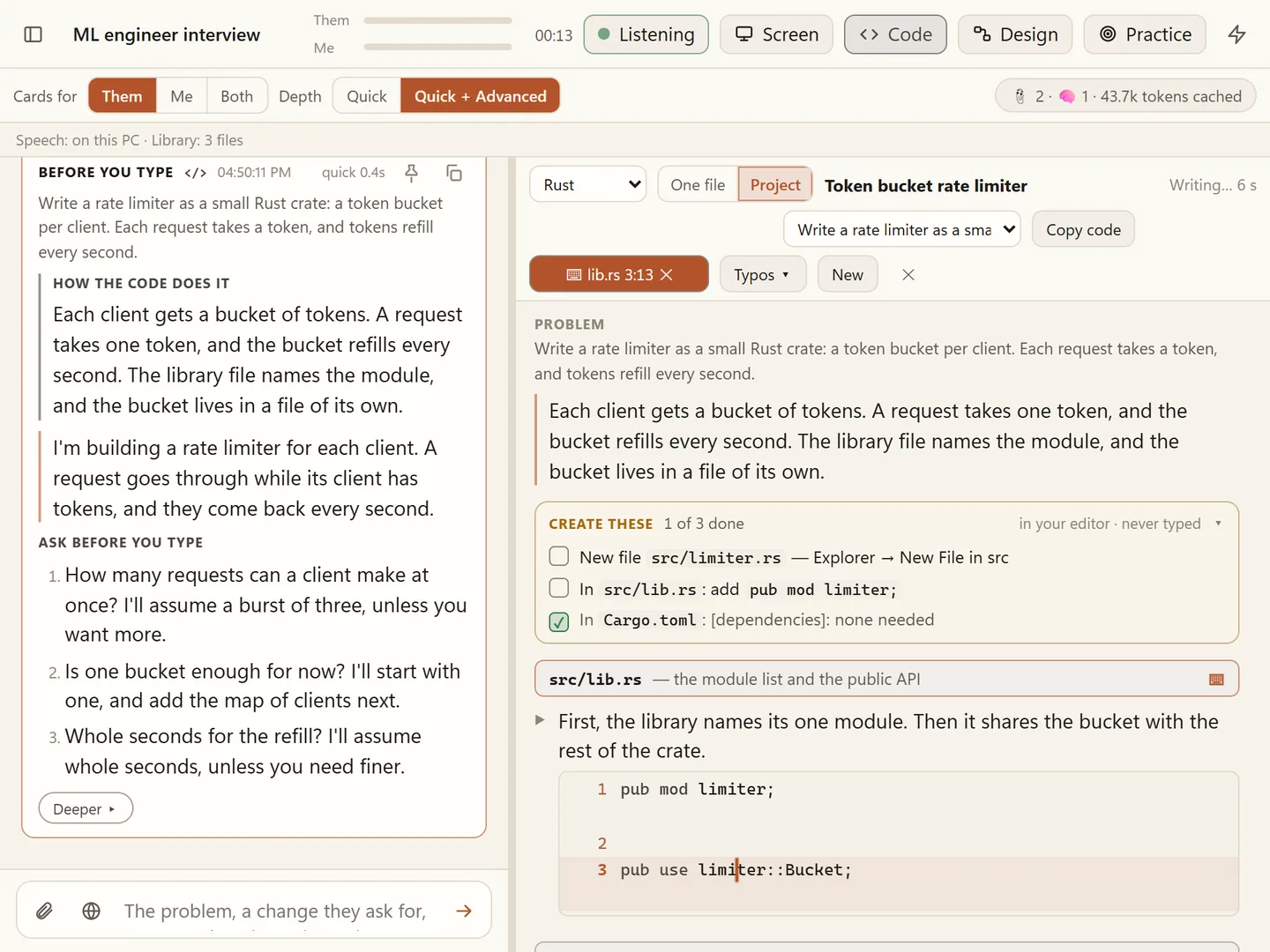
Types the code for you, one key at a time

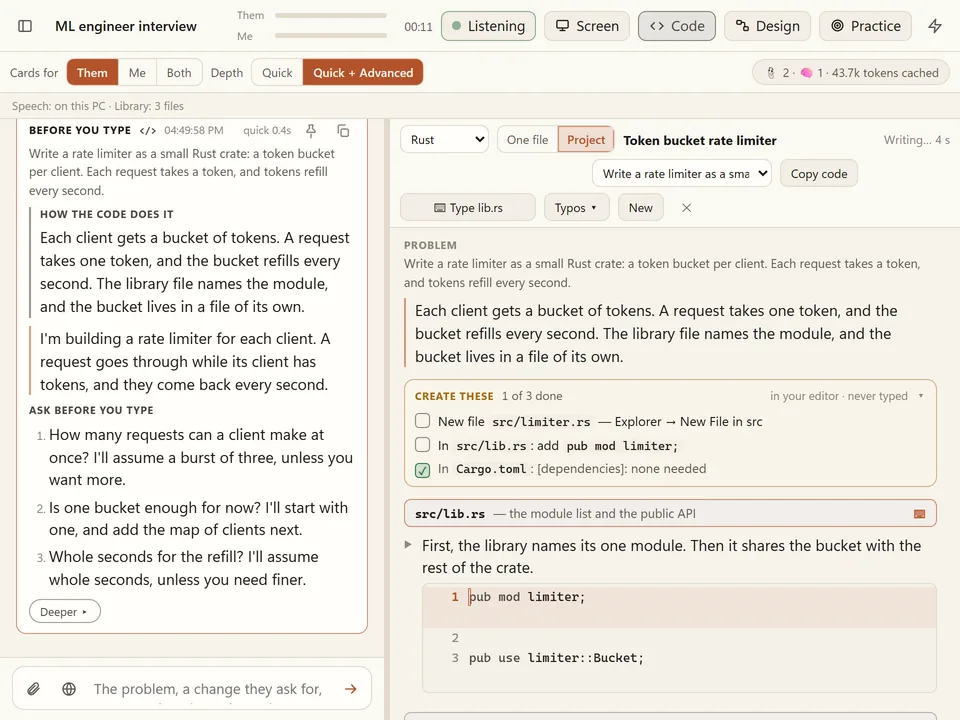
In a coding round, NextBeing writes the solution. Each key you press then types its next character into your editor. The code appears as you type. Works in CoderPad, HackerRank and any editor.

  1. 1It reads the coding problem from your screen or from the call.
  2. 2It writes the solution, with one sentence to say for each line.
  3. 3Click in your editor and press any keys. Stop pressing and the typing stops.
The coding round: the problem, the questions to ask, the code with a sentence per line, typing on.
03

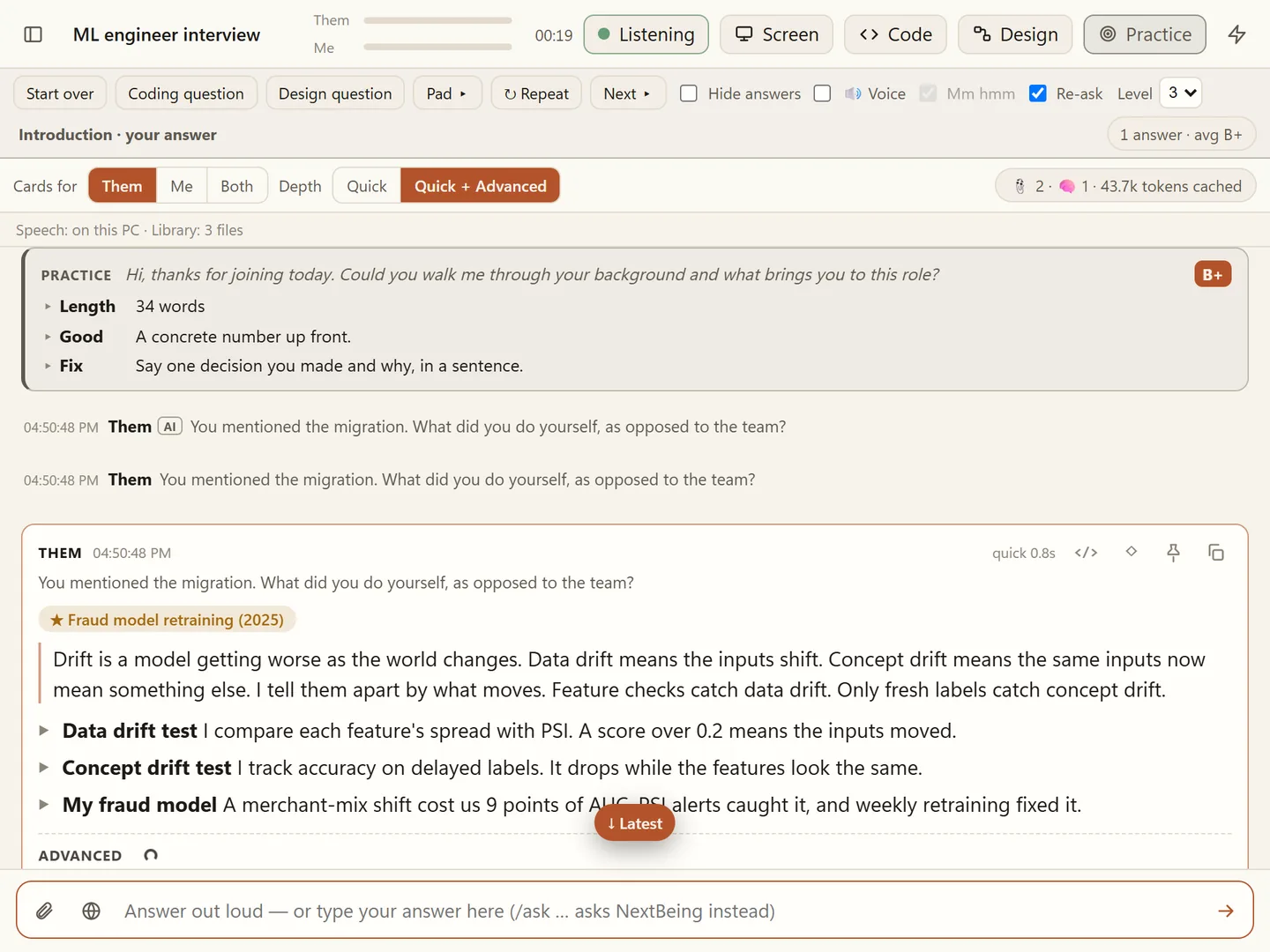
Practice mode

An AI interviewer asks you questions out loud. It listens to your answers and grades them.

  1. 1Pick a level and a round: behavioural, coding or system design.
  2. 2Answer out loud, as you would in a real interview.
  3. 3You get a grade and what to fix. Missed questions come back.
Practice mode: the interviewer's question and your graded answer: grade, length, what was good, what to fix.
04

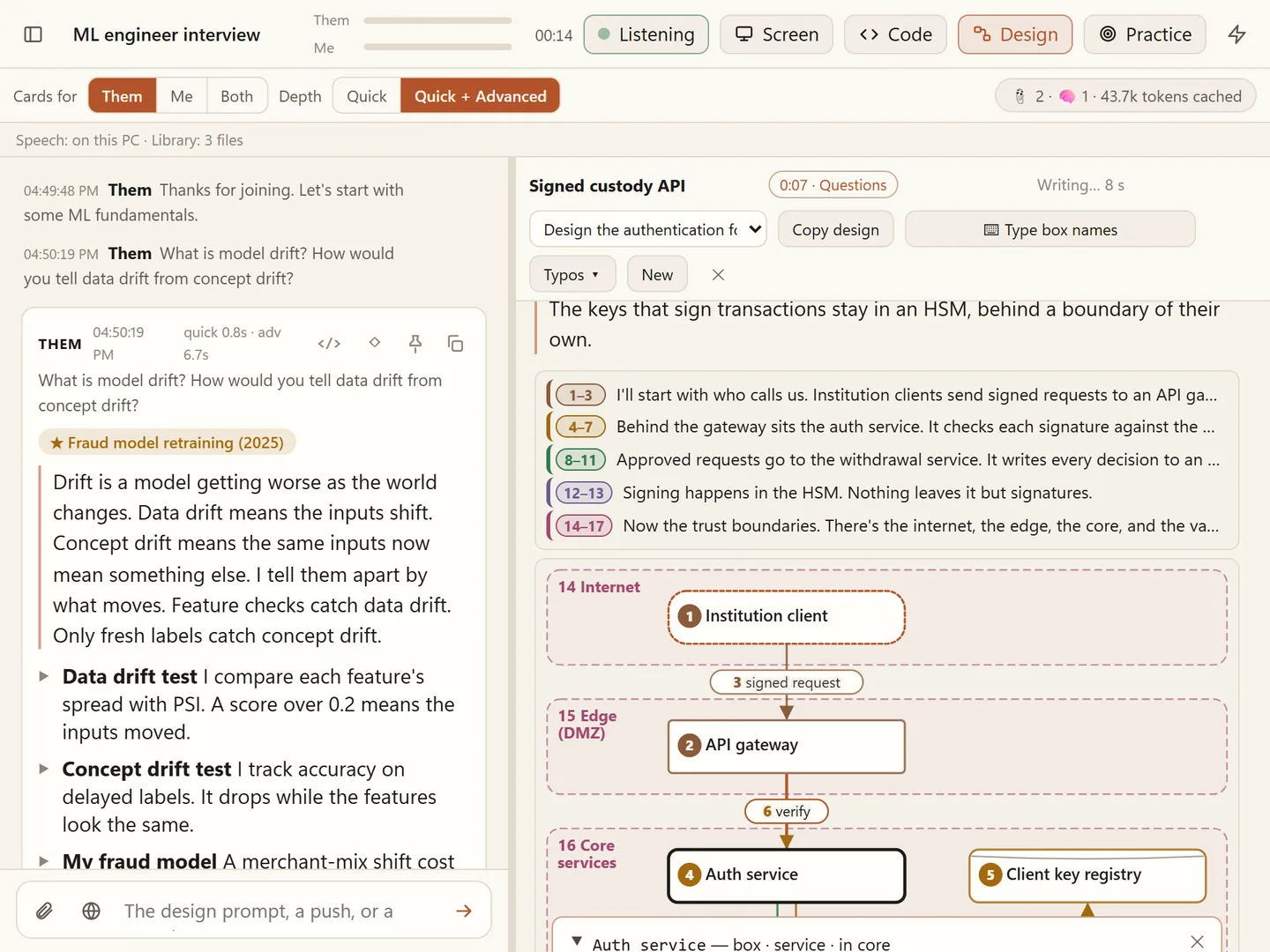
System design rounds

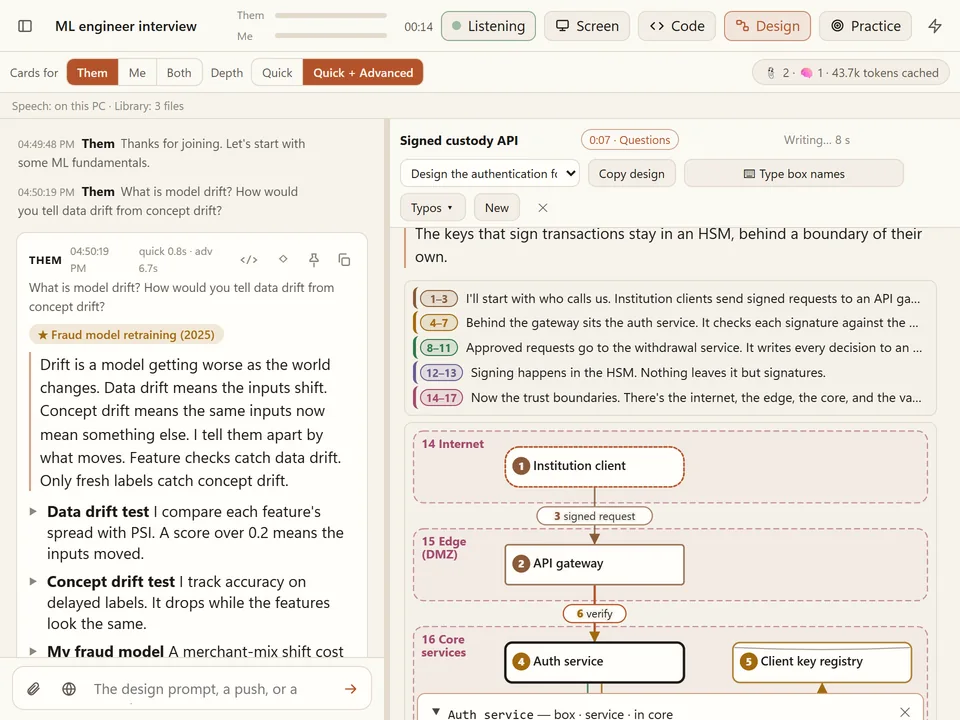
It draws a system design you can copy onto your board. It updates it when the interviewer asks for more.

  1. 1It draws the first version: the boxes, the arrows and what each part does.
  2. 2The interviewer adds a requirement. It shows the change for you to accept.
  3. 3Click a box to see what it does, with example code.
The design round: the chat on the left, the board on the right, one box opened.
05

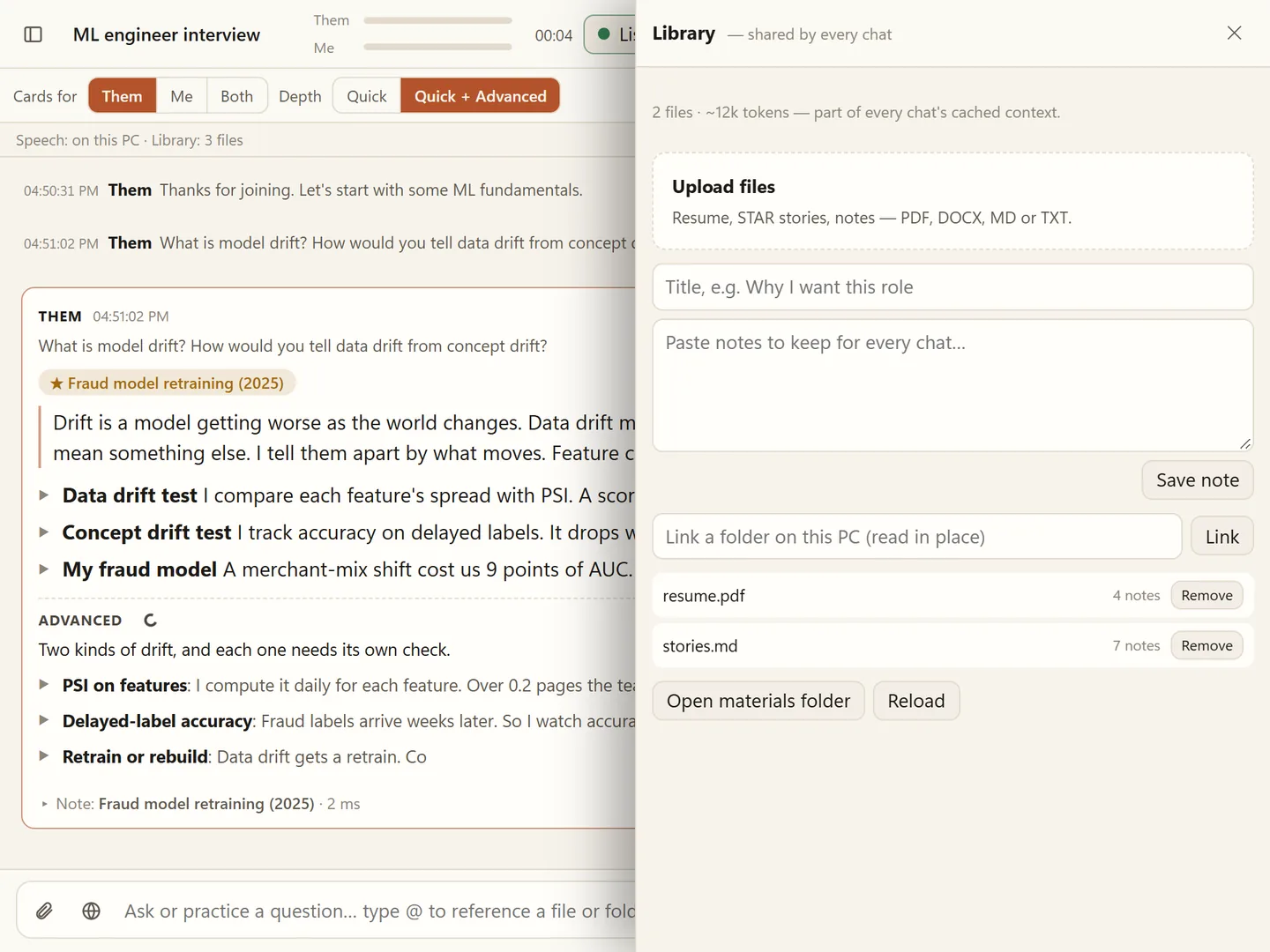
Answers from your resume and notes

Upload your resume, project notes and the job description. Every answer uses your real projects, names and numbers.

  1. 1Upload a resume, notes or a job description: PDF, Word or text.
  2. 2Answers use your own projects and numbers, in the first person.
  3. 3If a question comes up again, you get the same story again.
The Library: upload files, add a note, the files it uses.
06

Hidden from screen sharing

With it on, screen shares, recordings and screenshots don't show the NextBeing window.

  1. 1Works with Zoom, Teams, Meet and recorders. A camera can still see your screen.
  2. 2Your notes and settings stay on your PC.
  3. 3The other person's voice is not saved unless you keep a transcript.
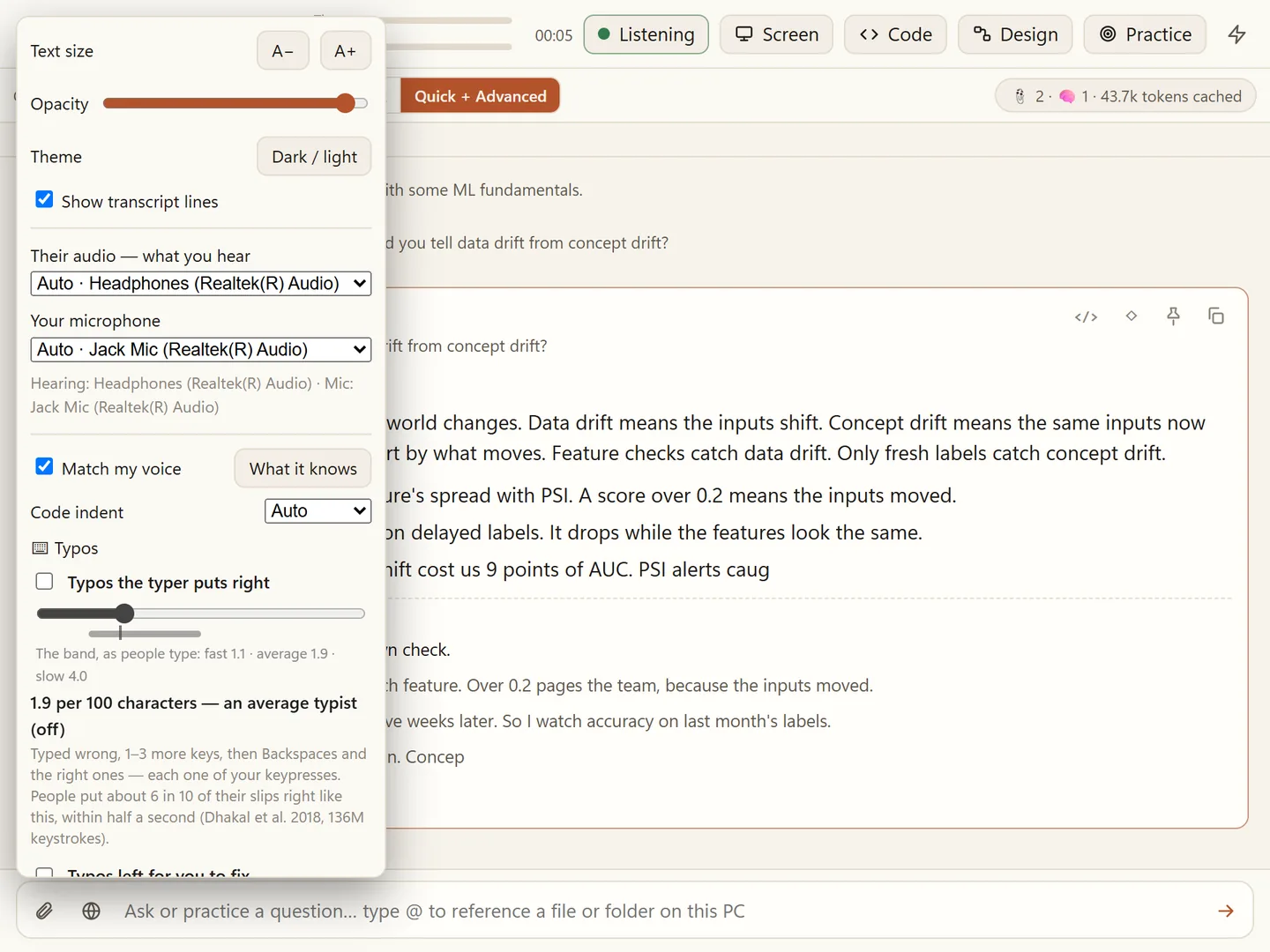
Settings: text size, theme, audio devices, typing options.

Pricing

Join the waitlist now. Waitlist members get a launch discount.

Starter
To prepare for your interviews.
$49/mo
14-day money-back guarantee
  • About 5 practice sessions or 2 interviews a month at a typical pace
  • AI interviewer with voice; graded answers
  • Live answers in about a second
  • Types the code for you
  • Uses your resume and notes
Join the waitlist
Pro Better value
For an active job search.
$129/mo
14-day money-back guarantee
  • About 15 practice sessions or 6 interviews a month at a typical pace
  • Everything in Starter
  • Room for back-to-back rounds
Join the waitlist
Prices in USD. Cancel any time.Add credits anytime: $5 to $499, on either plan.Windows app coming soon. Mac later.

Where you can use it

Practice anywhere. Use Live only where AI help is allowed: sales calls, client meetings, and interviews that permit it.

What it stores

Your notes and settings, on your PC. Nothing of the other person unless you keep a transcript.

What you need

Windows 10 or 11, a microphone, and an internet connection.

Questions

What is NextBeing?

NextBeing is an AI interview assistant for live coding rounds and practice. It's a Windows app. It listens to your interview and, about a second after each question, shows you an answer to say. Answers come from your resume and notes. It never speaks for you.

Is it allowed in interviews?

Use it where AI help is allowed: sales calls, client meetings, and interviews that permit AI tools. Some companies forbid it, so check the rules first. For those interviews, use Practice mode to prepare. It asks you questions and grades your answers until you don't need help.

How fast is the answer?

The first answer appears about one second after the question ends. We measured it over 32 test interviews on Oct 22, 2026. The median was 1.0 s, and 1.6 s at the slow end (90th percentile). A longer, detailed answer starts a few seconds later.

Can CoderPad, HackerRank or Zoom see it?

With the setting on, Windows leaves the NextBeing window out of screen shares, recordings and screenshots. We tested this on Oct 21, 2026. A camera pointed at your screen can still see it. The typer sends real key presses, so nothing is pasted.

I haven't interviewed in years. Where do I start?

Start with Practice mode. An AI interviewer asks a real question out loud and listens to your answer. You get a grade, what was good and what to fix. Questions you missed come back the next day. Most people do two or three practice sessions before a real interview.

Does the typer type by itself?

No. It only types when you press keys. Each key you press types the next character of the code. Stop pressing and it stops. If you want, it can add a few natural typos. It also checks your screen and marks any mistakes in red.

Which interview rounds does it cover?

Behavioural questions, technical questions, coding rounds and system design rounds. For coding it supports Python, Rust, Go, Java, JavaScript, TypeScript, C++, C# and more. Each line of code comes with a sentence you can say to explain it. Every version is checked to compile first.

Does it work on Mac, and what does it cost?

The Windows 10 and 11 app is coming soon; Mac comes later. Join the waitlist for the download link and a launch discount. Starter costs $49 a month and Pro $129 a month. Add credits anytime, from $5 to $499. You can cancel any time.

Join the waitlist

The Windows app is coming soon.

We'll email you the day it launches. Waitlist members get a launch discount.

From $49 a monthCancel any time