Real-time interview answers in about two seconds
For the person being interviewed: NextBeing listens to the call and shows a short answer after each question. It's written from your resume, notes and the job description. Without it, a hard question can leave you hunting for an example in silence.
Windows 11 · Plans from $49 a month · 14-day money-back guarantee
On a phone? Email yourself the link for your PC.
Use Live only in interviews where AI help is allowed, and check the interview's rules first. Practice anywhere.
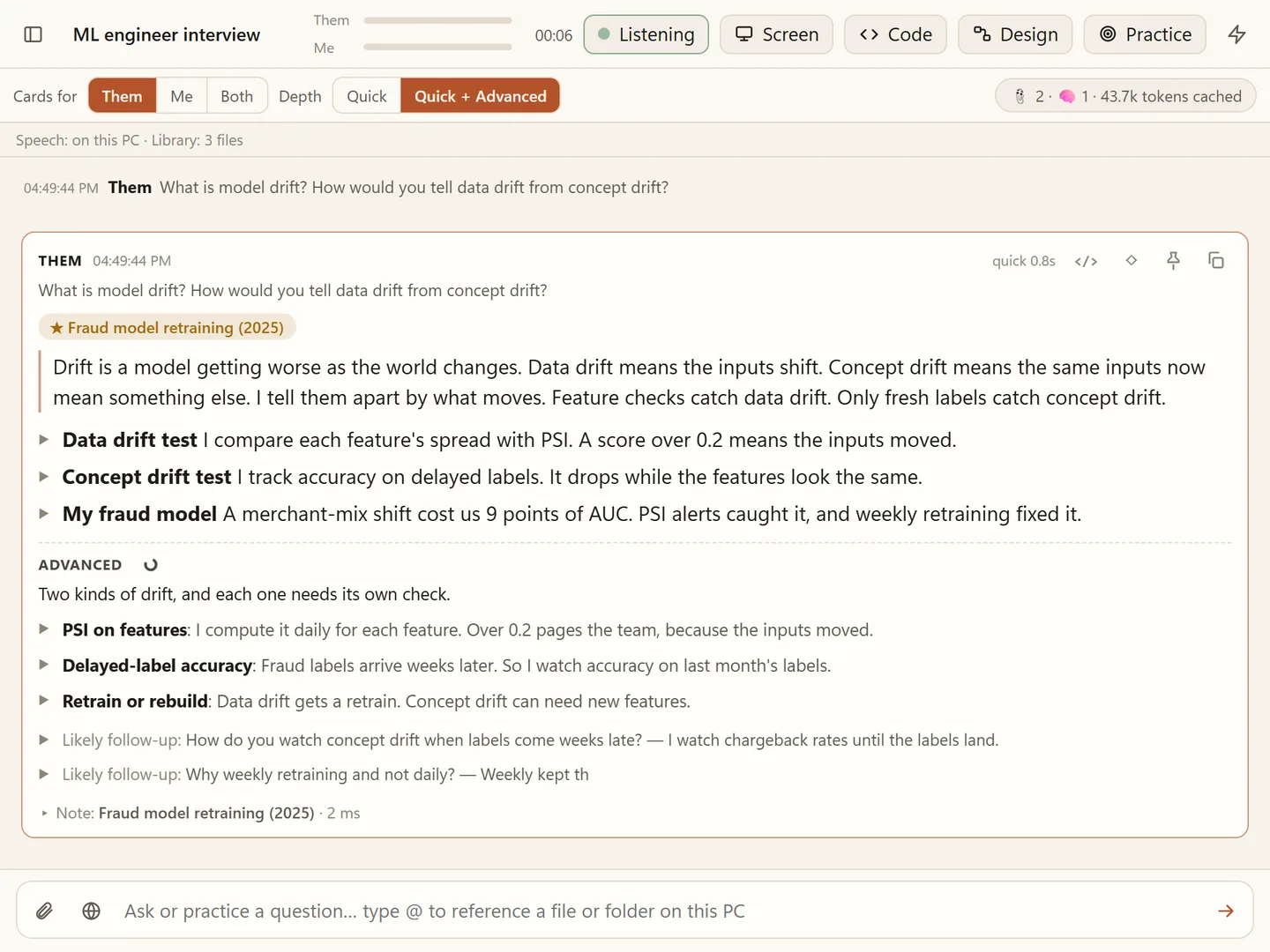
- The question as it heard it, so you can check it heard right
- A short answer to say first, written from your own resume and notes
- Points to add when they want more
Why it helps
You can start your answer at once
First comes one line to say; points open only if they ask for more. People hold about four things in mind at once (Cowan, 2001), so one line is easier to use mid-sentence than a paragraph.
Answers built from your own experience
Each answer is written from the resume, notes and job description in the chat, so it names your projects, tools and what the role asks for. Rare names from your documents come through spelled right.
Follow-ups are already prepared
Under the answer sits Deeper plan: the follow-ups they are likely to ask next, each with its own answer. It comes in closed. Open it when the interviewer digs in, and the next part is already written.
How it works
- Attach your resume, notes and the job description with + in a new chat.
- Click Listen when the interview call starts on your computer.
- Say the short answer at the top, in your own words.
- Click a point to open it when they ask for more detail.
Questions about live interview answers
Does it work with my interview app?
Yes. It hears the sound your computer plays, and your microphone. So any call app works the same way, in the browser or as a desktop app.
What does it hear and see?
Your call's audio and your microphone. Speech becomes text on your computer, and the audio is never stored or sent. It sees your screen only after you click Screen, and then only the window you work in.
What if it mishears a question?
The card shows the question as it heard it, so a mishearing shows at once. Press Alt+Shift+Q for a new answer to the question just asked. You always choose what to say.
Does it work on a Mac?
Not yet. The Mac app is coming soon, for Macs with Apple silicon on macOS 15 or later. The Mac page shows how it will work and can email you the day it is out.
What if I go blank mid-answer?
The short answer stays on screen. The next words to say are underlined and move on as you say them. So you can pick up where you stopped.
Does it speak for me?
No. It shows text on your screen and never speaks into the call. You read the short answer and say it in your own words.
What you can change
Four controls change which answers you get.
- A card nowMakes an answer at once for the question just asked: Alt+Shift+Q
- MemoryOpens what answers draw on: this chat's documents and notes
- ScreenLets answers use the window you work in, once you click it: Alt+Shift+W
- ListeningPauses and starts listening again: Alt+Shift+L
Step by step: on Windows → · on a Mac →
More: Coding interview exercises · AI mock interviews · Code typer · System design interviews · Answers from your resume