AI mock interview from your resume and the job
An AI interviewer asks you questions out loud, from the job and your resume. Each answer gets a grade and what to fix, and missed questions return days later.
Windows 11 · Plans from $49 a month · 14-day money-back guarantee
On a phone? Email yourself the link for your PC.
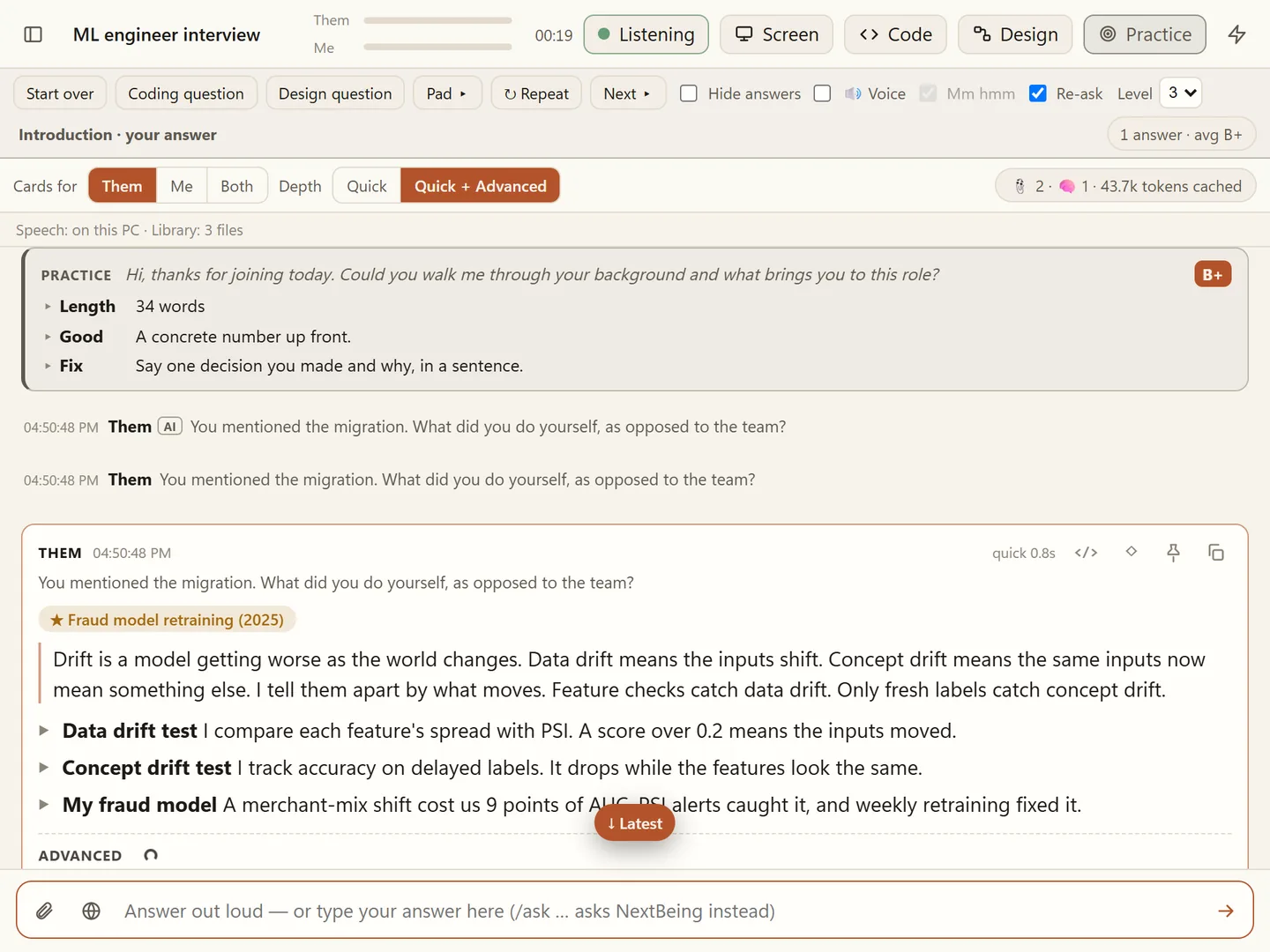
- The question, asked out loud and drawn from the job and your resume
- Your spoken answer, written out so you can read back what you said
- Its grade, with what worked and what to change next time
Why it helps
It practices the interview you will have
The questions come from the job description and your resume, and one digs into a project your resume names. Pick a recruiter screen, a hiring-manager call, a coding or design round, or a full loop. Set the level from entry to staff. Auto picks the type from your documents.
You know exactly what to fix
Each answer gets a grade: A to C, or F if it is wrong at its core. Under it, one line says what was good. Another says what to fix. Feedback on what to change helps more than a score alone (Hattie & Timperley, 2007).
What you practice stays with you
Questions you miss come back after a day, three days and a week. They keep coming back until you answer them well. Practice spread over days is remembered longer than practice in one sitting (Cepeda et al., 2006).
How it works
- Attach the job description and your resume with + in a new chat.
- Click Practice, and the interviewer asks its first question out loud.
- Answer out loud, or type your answer in the message box.
- Read your grade, with what was good and what to fix.
- Press ↻ Repeat to try again, or Next ▸ for a new question.
- Come back on later days to meet the questions you missed.
Questions about AI mock interviews
Does it work for jobs without code?
Yes. Pick Recruiter screen or Hiring manager, or turn off the code round in the Interview menu. You get questions about your work, your stories and your resume. Instead of a coding round, you talk through a case.
What does it hear?
Only your microphone, while you practice. Your speech becomes text on your computer, and the audio is never stored or sent. The text of your answers goes to our servers to be graded.
What if a grade seems wrong?
Read its Good and Fix lines: they say what it counted and what it missed. Press ↻ Repeat to answer the same question again, and the new answer gets its own grade.
Does it work on a Mac?
Not yet. The Mac app is coming soon, for Macs with Apple silicon on macOS 15 or later. The Mac page shows how it will work and can email you the day it is out.
Can I type instead of speaking?
Yes. Type your answer in the message box, and it is graded the same way as a spoken one. You can also turn the interviewer's voice off and read the questions instead.
How is this different from a live interview?
Here NextBeing plays the interviewer and grades you. In a live interview, a real person asks, and NextBeing shows you answers to say.
What you can change
Five controls on the practice bar.
- InterviewMatches the round you face: Auto, or one of five types
- LevelMakes the interviewer easier or harder, from 1 (entry) to 5 (staff)
- RoundsMoves to a coding or a design question now
- Pad ▸Opens a pad in your browser: code with Run, a board, notes
- VoiceReads the questions out loud, at a volume from 25% to 200%
Step by step: on Windows → · on a Mac →
More: Coding interview exercises · Live interview answers · Code typer · System design interviews · Answers from your resume